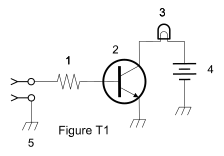
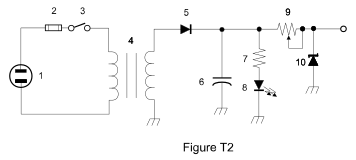
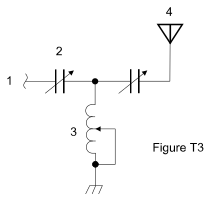
Section 2.4: Circuit Diagrams: Putting It All Together #
By now, you’ve gotten to know a lot of different components — resistors, capacitors, transistors, and more. You’ve seen their symbols sprinkled throughout earlier sections, and hopefully, they’re starting to feel familiar. Now it’s time to gather everything in one place and focus on how these symbols are used in circuit diagrams.
Key Information: A schematic is an electrical diagram that uses standard component symbols. The most important thing to remember is that schematics show component connections accurately.
Think of a schematic as a map for electronics. Instead of using pictures of actual parts, it uses standard symbols to show how components connect. Once you know how to read them, circuit diagrams are your key to understanding any electronic device, no matter how complicated.
Essential Components and Their Symbols #
Let’s review the key components you’ll encounter in circuit diagrams. Pay special attention to how they control or affect current flow in a circuit.
Basic Components #
These are the passive components we covered in Section 2.1 — the ones that don’t need their own power source to do their job.
| Component | Description | Symbol |
|---|---|---|
| Resistor | That familiar zig-zag line represents a component that controls current flow. You’ll see these everywhere in circuits. | 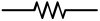 |
| Variable Resistor (Potentiometer) | Like a regular resistor, but with an arrow showing you can adjust its value. | 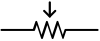 |
| Capacitor | Two parallel lines that store electrical energy. You’ll see both polarized (with one straight line and one curved line) and non-polarized versions — both are still capacitors. | 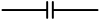 |
| Inductor | A coil of wire which stores energy in a magnetic field |  |
| Transformer | Two coils side by side show energy transfer between circuits. | 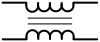 |
| Variable Inductor | A coil with an arrow showing you can adjust its value. | 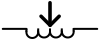 |
Active Components #
These are the semiconductors from Section 2.2 — the ones that control or amplify current in ways passive components can’t.
| Component | Description | Symbol |
|---|---|---|
| Transistor | Control current flow and provide amplification. On a BJT like the one shown, the arrow on the emitter points in the direction of conventional current flow. | 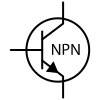
|
| Diode | As seen in Section 2.2, the arrow points toward the cathode. | 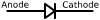 |
| LED (Light Emitting Diode) | Like a regular diode but with arrows showing it emits light. | 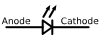
|
Power and Indicators #
These components represent energy sources, visual signals, and the connection point where a circuit meets the outside world.
| Component | Description | Symbol |
|---|---|---|
| Battery | Long and short lines show positive and negative terminals. | 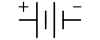
|
| Lamp | A visual indicator. | 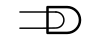
|
| Antenna | A line with smaller lines at an angle represents an antenna, where signals enter or leave the circuit. | 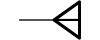 |
Reading Circuit Diagrams #
Schematics might look complicated at first, but they’re just maps showing how components connect. A few things to look for when you’re reading one:
- Start at the power source (usually a battery) and follow the connections between components.
- Components are usually labeled (R1, C1, etc.) with their values shown nearby.
- Where lines meet, connection points are shown by dots — lines that cross without a dot aren’t connected to each other.
As a Technician Class operator you won’t need to know this stuff in depth, but there are a few questions you might see on the exam which require you to identify a component by its symbol — make sure you look them over carefully so you know what to look for!



 Schematic